

 Back to Blog
Introduction
Over the last few blogs, we have looked at TDE and its impact on Oracle hybrid and multi-cloud deployments. This included: How OCI’s TDE makes hybrid environments more complex, what TDE is, and Oracle SE on OCI hybrid environment architectures.
One question that keeps coming up from customers and partners is, “Can I actually run Oracle Standard Edition on-premise and use OCI as my DR site?” The short answer is “yes”, and in this blog, I’ll walk through a step-by-step process for configuring an Oracle hybrid DR setup with an on-premises primary and an OCI DBCS standby.
Whether you are running Enterprise Edition or Standard Edition, this blog aims to give you the clarity you need to get it right the first time.
What you need to figure out first
Before diving into configuration, there are a few important questions worth answering:
-
Which Oracle version best supports this cleanly?
-
What parameters govern TDE behaviour across environments?
-
Is Standard Edition supported, or is this Enterprise-only?
-
How straightforward is it to create a standby database in OCI?
-
What are the actual steps involved in getting everything running?
Let’s address each of these as we go.
Getting the version right matters more than you think
Not all Oracle visions support hybrid DR with OCI. Therefore, the very first step is to ensure your database is on a version and release that supports hybrid DR with OCI.
In version 19.16, Oracle introduced the TABLESPACE_ENCRYPTION parameter, which supersedes the older ENCRYPT_NEW_TABLESPACE parameter. This newer parameter is central to making hybrid setups work properly.
Understanding TABLESPACE_ENCRYPTION (this is the important part)
This parameter accepts three values, each suited to a different environment and use case:
AUTO_ENABLE – This is the default on OCI DBCS. It ensures that every new tablespace is automatically encrypted. On OCI, this setting cannot be changed, regardless of licensing.
MANUAL_ENABLE – This is the default for on-premises environments. Tablespaces are only encrypted if you explicitly specify encryption.
DECRYPT_ONLY – This value ensures that tablespaces are not encrypted at all. It is available only for on-premises environments.
For hybrid DR, this is the critical piece: on-premises primary must be set to DECRYPT_ONLY.
For detailed reference, Oracle’s official documentation on this parameter is available at: Oracle TABLESPACE_ENCRYPTION Documentation
Why DECRYPT_ONLY matters for hybrid DR
To successfully configure a hybrid environment where OCI serves as the DBCS standby, the on-premises primary must have TABLESPACE_ENCRYPTION set to DECRYPT_ONLY.
Here is why it matters: when your OCI environment becomes the primary (during a switchover or failover), any new tablespaces it creates will be encrypted by default. The DECRYPT_ONLY setting on the on-premises standby ensures that those tablespaces are decrypted when they arrive, keeping the standby environment functional and consistent. This is actually where many previous hybrid DR attempts fell over.
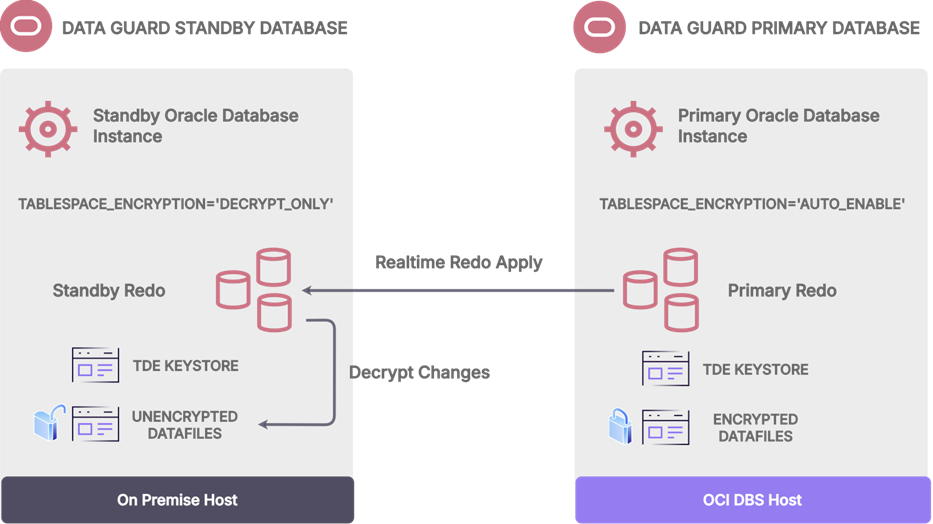
(Figure 1: Hybrid DR architecture – On-premises primary with OCI DBCS standby)
Step-by-step setup: Enterprise Edition setup
Below is the complete process for setting up the standby database in OCI DBCS with an on-premises primary, for Enterprise Edition.
On-premises primary configuration
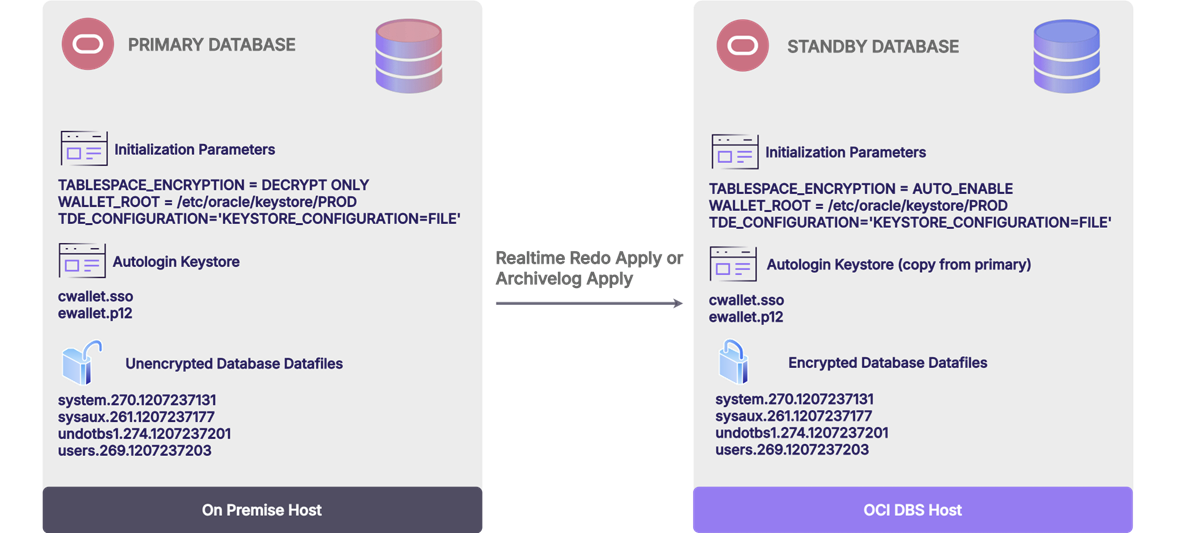
Start by creating the keystore directory and setting the essential parameters:
$ mkdir /etc/oracle/keystore/PROD
SQL> ALTER SYSTEM SET tablespace_encryption = DECRYPT_ONLY SCOPE=SPFILE;
SQL> ALTER SYSTEM SET wallet_root = '/etc/oracle/keystore/PROD' SCOPE=SPFILE;
SQL> ALTER SYSTEM SET standby_file_management = AUTO SCOPE=SPFILE;
SQL> STARTUP FORCE;
SQL> ALTER PLUGGABLE DATABASE ALL OPEN;
SQL> ALTER PLUGGABLE DATABASE ALL SAVE STATE;
Next, configure the TDE keystore and generate the master encryption key:
SQL> ALTER SYSTEM SET tde_configuration = 'KEYSTORE_CONFIGURATION=FILE' SCOPE=BOTH;
SQL> ADMINISTER KEY MANAGEMENT CREATE KEYSTORE IDENTIFIED BY <password>;
SQL> ADMINISTER KEY MANAGEMENT CREATE AUTO_LOGIN KEYSTORE
FROM KEYSTORE IDENTIFIED BY <password>;
SQL> ADMINISTER KEY MANAGEMENT SET KEY FORCE KEYSTORE
IDENTIFIED BY <password> WITH BACKUP CONTAINER=ALL;
OCI standby configuration
On the OCI side, ensure the following parameters are in place:
tde_configuration = 'KEYSTORE_CONFIGURATION=FILE'
wallet_root = '/etc/oracle/keystore/PROD'
tablespace_encryption = AUTO_ENABLE
-- (This is the default on OCI and need not be explicitly set)
Important: Copy the encryption keys from the primary to the standby’s wallet_root directory before proceeding.
Creating the standby with RMAN duplicate
With both environments configured, you can create the standby database using RMAN’s duplicate command. Before running it, make sure that the standby environment is reachable from the primary, the standby database is in NOMOUNT state, and your TNS and listener entries are properly configured.
We assume that you have provisioned the OCI DBCS environment with the same version as the primary, dropped the default database, and retained the unique database name to ensure it remains properly tied to the OCI console for patching and backups.
$ rman TARGET sys/xxxxx@prod AUXILIARY sys/xxxxx@stby
RMAN> DUPLICATE TARGET DATABASE
FOR STANDBY
FROM ACTIVE DATABASE
DORECOVER
SPFILE
SET db_unique_name = 'stdby' COMMENT 'Is standby'
NOFILENAMECHECK;
Enabling managed recovery
Once the standby database is created, enable managed recovery to begin applying redo data:
SQL> ALTER DATABASE RECOVER MANAGED STANDBY DATABASE
USING CURRENT LOGFILE DISCONNECT FROM SESSION;
From this point, you can activate the standby database for failover or perform a switchover for planned migrations. After activation, if you need to recreate the standby on-premises, you can restore the database as decrypted using the "Restore as Decrypted" approach.
What about Standard Edition?
The good news is that this hybrid DR approach works for Standard Edition as well! There is one notable difference: the standby_file_management parameter must be set to MANUAL on the on-premises environment, rather than AUTO.
Where most people struggle (and why we built StandbyMP disaster recovery for Oracle SE)
In practice, the challenge isn't the theory, it's the operational detail. For example:
-
Getting the encryption parameters right
-
Managing the wallet and keys
-
Copying the keys correctly between environments
-
Not breaking things during role transitions
If you are using Dbvisit StandbyMP, the process becomes significantly simpler. StandbyMP automates many of the tasks that would otherwise require manual intervention, including:
-
Setting the TABLESPACE_ENCRYPTION parameter in the on-premises environment
-
Configuring TDE settings, wallet roots, and encryption keys
-
Copying encryption keys to the standby database
-
PLUS, all of its normal DR actions such as log management, DR testing, zero-data-loss switchovers, monitoring, and notifications.
One critical reminder: always remember your TDE wallet password. Losing it can lock you out of your encrypted data permanently.
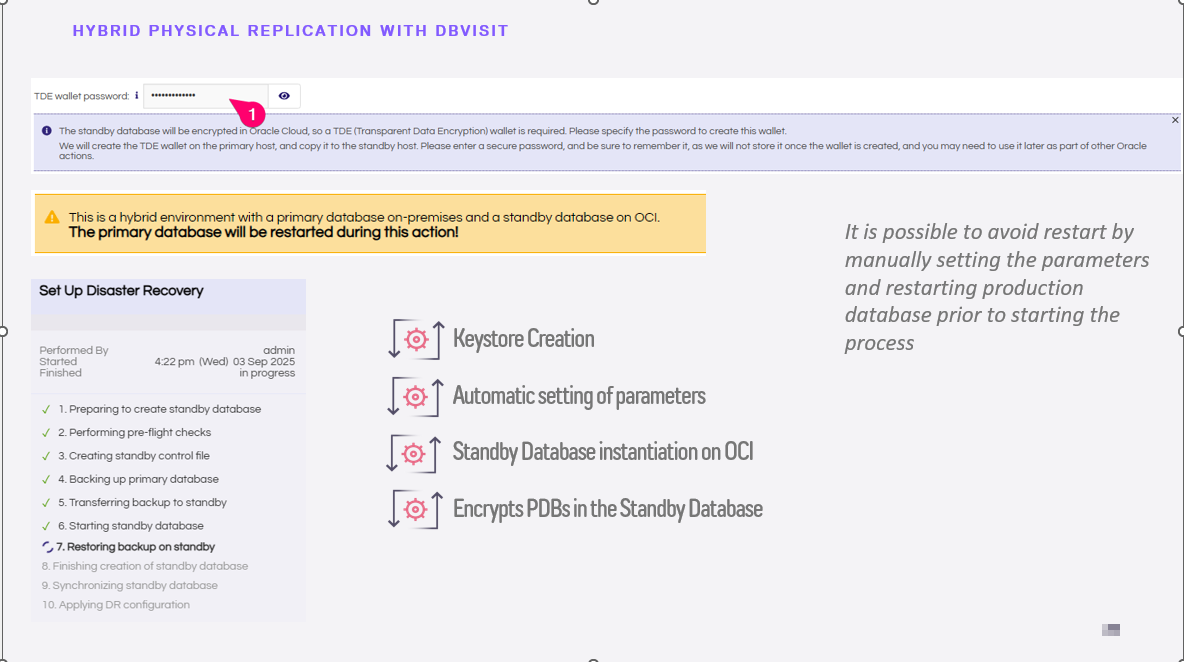
(Figure 3: Dbvisit StandbyMP automating the hybrid DR configuration)
For detailed configuration and setup instructions with Dbvisit StandbyMP, visit: OCI Hybrid Configuration Guide.
Conclusion
Setting up Oracle hybrid disaster recovery between an on-premises primary and an OCI standby is absolutely achievable. The key lies in understanding how TDE behaves across both environments and ensuring that the right parameters, especially TABLESPACE_ENCRYPTION, are configured correctly from the start.
For Enterprise Edition users, the process is well-defined: configure your keystore and wallet, set DECRYPT_ONLY on-premises, and let RMAN handle the duplication. For Standard Edition users, Dbvisit StandbyMP removes much of the manual burden, making hybrid DR accessible even without an Enterprise licence. You can access this through our free trial.
Whatever your edition, the most important takeaway is this: plan your encryption strategy before you build your standby. A little foresight here saves a great deal of troubleshooting later. And above all, never forget your TDE wallet password.
Check out the other blogs in our TDE series:
Blog #1: Oracle TDE and Hybrid Disaster Recovery: Why It Breaks & How to Fix It
Blog #2: What is Oracle TDE?
Blog #3: Oracle TDE Licensing: What you need to know
Blog: 4: Oracle TDE wallet setup: What DBAs get wrong and how to get it right

Tags: featured