


 Back to Blog
The two terms that always come to mind when we talk about disaster recovery are RTO and RPO. As a software company that deals with organisations across the globe, we often see that RTO can be optimised by fine-tuning external factors like applications and automating systems to take over rather than relying on human intervention. This effectively reduces the time it takes for systems to return to business as usual. However, RPO is something that is critically dependent on how much data loss the business can withstand. The less data loss it can withstand, the more complicated the systems become and the greater the cost of setting them up.
Most organisations and DBAs wish for an RPO of 0, which means there is no data loss. However, setting up systems for real zero data loss has many complexities. Of all the components in a system, the database is the most important because it determines how much data is lost (RPO), and also how long it takes for the user to access the data after recovery from failure (RTO).
Let’s look more deeply at RPO, which depends on the last transaction that can be recovered in your DR database if production fails.
The existing DR capabilities for Enterprise Edition and Standard Edition
Within the Oracle database realm, disaster recovery can be divided mainly into two categories. Systems running Enterprise Edition or systems running Standard Edition.
First, let’s look at the MAA options within Enterprise Edition, which offers different tiers of database protection. As the tiers progress from Bronze to Diamond, costs and management overhead increase dramatically. Now, many of these Tiers or Technologies will not be feasible for every Enterprise Edition user, but these options are valuable to have if needed.
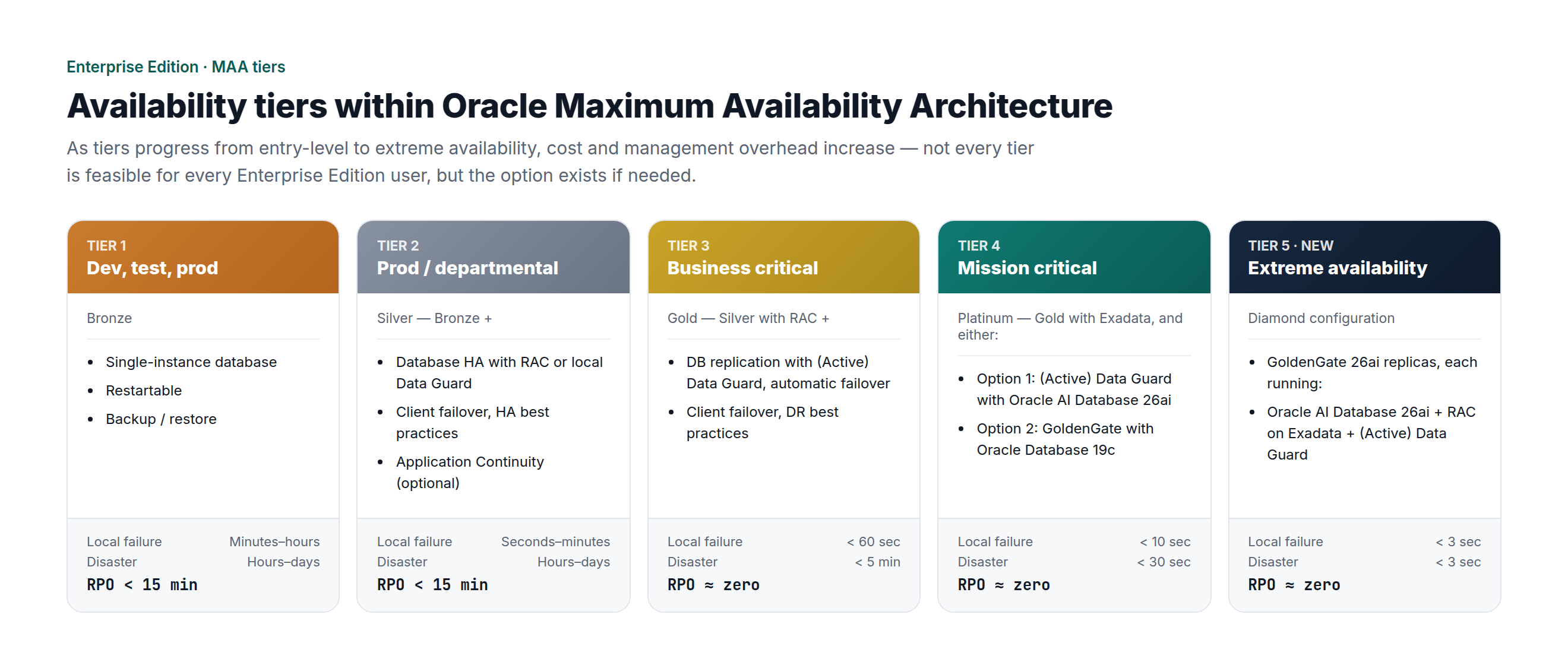
Now, let’s look at Data Guard, the default for a warm standby on Oracle Database Enterprise Edition. Drilling deeper, there are actually three different operating modes for Enterprise Edition. These modes essentially determine how much commit latency you can accept in exchange for bringing potential data loss closer to zero.
Data Guard Modes:
-
Mode 1: Maximum Performance
-
Mode 2: Maximum Availability
-
Mode 3: Maximum Protection
The simplest way to explain these is:
Maximum Performance, the default mode, uses asynchronous redo transport. The primary acknowledges the commit as soon as the redo is written locally, without waiting for the standby. Therefore, there is no latency penalty from the standby, but a non-zero data-loss window remains.
Maximum Availability uses synchronous transport with AFFIRM. The primary waits for the standby to confirm that the redo has been written to its standby redo log before the commit returns, providing zero data loss during normal operation. However, if the standby becomes unreachable, it drops back to Maximum Performance-like behaviour rather than stalling the primary, so availability is never sacrificed for protection.
Maximum Protection uses the same synchronous transport with AFFIRM but does not make any compromises. If the standby does not acknowledge the redo, the primary stalls rather than allowing an unprotected commit, guaranteeing zero data loss at the cost of primary availability. This mode usually has more than one standby database, so the outage of a single standby does not affect production.
The mode you choose should be determined by firstly the cost of losing transactions in the event of a failure, and secondly, whether protecting the latest transaction is more or less important than ensuring primary availability. Since a single transaction can determine whether your standby has an RPO close to zero, let’s look more deeply into the journey of a database transaction, from the user session all the way to the standby database.
The journey of a transaction from the user session to the standby database
To see where zero data loss is won or lost, we’ll follow a single transaction from the moment the user commits it on the primary database to the moment its redo reaches the standby. Under Oracle’s normal commit behaviour, the transaction is committed once its redo is safely recorded in the primary’s online redo log. However, this does not necessarily mean that the transaction is protected at the disaster recovery site. That protection depends on whether the redo has also reached the standby before the primary system is lost.
When a session changes a block, Oracle does not necessarily write the changed block to disk at anywhere near the commit time.
-
Instead, Oracle writes redo change vectors that describe the modification to the redo log buffer in the SGA.
-
On COMMIT, the session posts LGWR and waits for it to complete.
-
LGWR flushes every redo record, up to and including the commit marker, from the buffer to the current online redo log group on disk. Only once that write is acknowledged does control return to the session.
-
This is the Log file wait event shown in AWR reports. At this point, the transaction is committed (consistent) and can be recovered from the online redo log even if the instance crashes a millisecond later, because instance recovery will replay the required redo.
-
At this stage, dirty buffers in the database buffer cache do not determine whether the transaction is committed. DBWR writes those data blocks to the datafiles later, on its own schedule. In Oracle, commit consistency depends on redo reaching persistent storage, not on the data blocks having already reached the datafiles.
At this stage, the commit that the application saw succeed is guaranteed against instance failure, but only by a redo record in the online redo log on the primary host. However, that protection exists only on the primary host. If you lose that host or site, the online redo logs may be lost with it. The only transactions you can recover at the standby are the ones whose redo has physically reached the standby. So the key disaster-recovery question is therefore not simply, “Has the transaction committed on the primary?” but “Has its redo reached the standby?”
Where the window opens
In a conventional archived log shipping model, the answer might be uncomfortable. Redo accumulates in the current online redo log group as transactions commit. While that log remains current, it is not yet available as a complete archived redo log for transfer. When the log fills, a log switch is forced, or ARCHIVE_LAG_TARGET triggers a switch, LGWR moves to the next online redo log. The archiver process (ARCn) can then copy the now-inactive log to an archived redo log file. It is that file, once it exists in full, that gets transferred to the standby and applied by recovery.
To reiterate this important point, every transaction that has been committed to the current online redo log, but has not yet gone through a log-switch, archive, and transfer cycle, is committed and consistent on the primary but absent from the standby. If the primary is catastrophically lost during that interval, those acknowledged commits are unrecoverable at the DR site.
This is the data-loss window, and it is tied to the log switch. Its width is not a fixed number of seconds; it breathes with the rate at which the database generates redo. A quiet database might expose several minutes of committed transactions. A busy database may archive and transfer logs more rapidly, but it can still leave a meaningful amount of committed redo unshipped at the moment of failure.
The exposure is not smooth or constant: it grows while the current redo log fills, then drops at each log switch. This is why an average RPO can understate the tail risk that matters.
The data-loss window consists of redo that is committed on the primary but has not yet been transmitted to the standby.

Now we can see why redo logs play such an important role in the recovery process when it comes to zero data loss. This is relatively easily achieved with Enterprise Edition with the protection modes and also the ability to sync the redo logs on standby using the RFS process that receives and writes the entries to the standby redo logs.
Unfortunately, this capability is not available with Oracle Database Standard Edition, because it does not include Data Guard. Native archive-log transfer from the primary to the standby, coordinated by scripts, can keep the standby updated but cannot provide the same level of protection.
Before Dbvisit StandbyMP 12.4, its RPO was typically measured in minutes. It depended on the automated standby update schedule and factors such as archive-log size, log-switch interval, and network bandwidth. Another limitation is that Standard Edition does not support standby redo logs, so redo cannot be synchronised directly from the primary to the standby in the same way.
The paradigm has changed
With the release of the Zero Data Loss (ZDL) option with Dbvisit Standby MultiPlatform version 12.4, it’s possible to reduce data-loss exposure between the primary and standby databases on Standard Edition to a sub-second level. This is how it works.
-
Dbvisit StandbyMP keeps the standby database in sync with the primary at regular intervals by shipping archived redo logs.
-
In addition, redo logs from the primary are independently synchronised to the standby server.
-
This is continuously monitored and reported in the dashboard as “Data Loss Exposure”.
-
If the standby database must be activated, StandbyMP can use the synchronised redo marked as “ACTIVE” on the standby server to close the remaining gap. In supported environments, this can reduce data-loss exposure to a sub-second level.
The architecture of ZDL is very simple and straightforward, as described in the image below.
.png?width=2560&height=988&name=4-zero-data-loss-architecture%20(1).png)
The key points to remember about the ZDL option are:
-
ZDL captures redo changes on the primary and sends them to the standby (managed by the primary and standby dbvagentmanagers).
-
StandbyMP redo member replicas on standby are not part of the standby database.
-
Transactions that are replicated to StandbyMP redo member replicas on standby are used and applied only during the standby database activation process (failover).
Overview of methods available for near-zero data loss
The table below provides an overview of the options available for ZDL in Oracle environments. What interests me most is the cost of the Enterprise Edition options, as well as options such as ZDLRA, which can require significant capital expenditure to purchase and manage the appliances in your own data centre. This does not mean that Enterprise Edition options such as ZDLRA are unnecessary; rather, organisations should assess their requirements and work from there.
.png?width=2720&height=1080&name=5-zero-data-loss-options-table%20(1).png)
Monitoring your standby environments
Let's look a bit deeper and explore how to effectively monitor systems that are designed to provide zero data loss. To keep it simple, let's look at Data Guard and Dbvisit StandbyMP with ZDL. When monitoring Data Guard, consider the following indicators to confirm its status and whether the standby is in sync with the primary.
Data Guard monitoring methods
Redo transport status. V$ARCHIVE_DEST_STATUS (STATUS, ERROR) tells you whether a destination (primary log archive dest_n) is shipping. A destination can sit in ERROR or VALID but lagging, while the primary runs untouched.
Apply / MRP process. The managed recovery process can stop or die; V$MANAGED_STANDBY and V$DATAGUARD_STATS show status, but only if you look. A hung MRP means the standby is behind no matter how healthy transport is.
Transport lag vs. apply lag. V$DATAGUARD_STATS distinguishes the two, and they fail independently. Low transport lag with high apply lag still means a slow, non-zero-loss recovery at failover.
Protection-mode / SYNC health. A synchronous destination that loses contact silently degrades Maximum Availability to resynchronisation, effectively async, so you must confirm it is genuinely in sync, not merely up.
Archive gaps. V$ARCHIVE_GAP and FAL-based gap resolution normally resolve themselves, but an unresolved gap blocks recovery and persists until noticed.
Standby redo logs and RFS. They must exist, be correctly sized and be actively received. A misconfiguration quietly forces slower archive-based transport and widens the window.
No logging / unrecoverable operations. These can create logical gaps or block corruption on the standby that transport and lag metrics will not surface; a separate check entirely.
Broker, observer and failover readiness. With the broker in play, SHOW CONFIGURATION warnings, observer health and VALIDATE DATABASE are what actually confirm a zero-data-loss failover will succeed.
The alert log. Many ORA-16xxx Data Guard conditions appear only here, so without parsing it on a schedule, they go unseen. You can also use the database attention log to easily track Data Guard-related issues.
Dbvisit StandbyMP monitoring methods
Dbvisit StandbyMP displays the same core information as Data Guard through an intuitive GUI and an efficient monitoring approach. This allows gaps to be monitored, managed, and, in some cases, resolved without logging in to the underlying database servers.
The StandbyMP image below shows the “View Data Loss Exposure” screen. It displays the information needed to assess whether the standby database is protected, together with exact timeframes, SCNs, and timestamps. This information is also accessible via API and CLI.
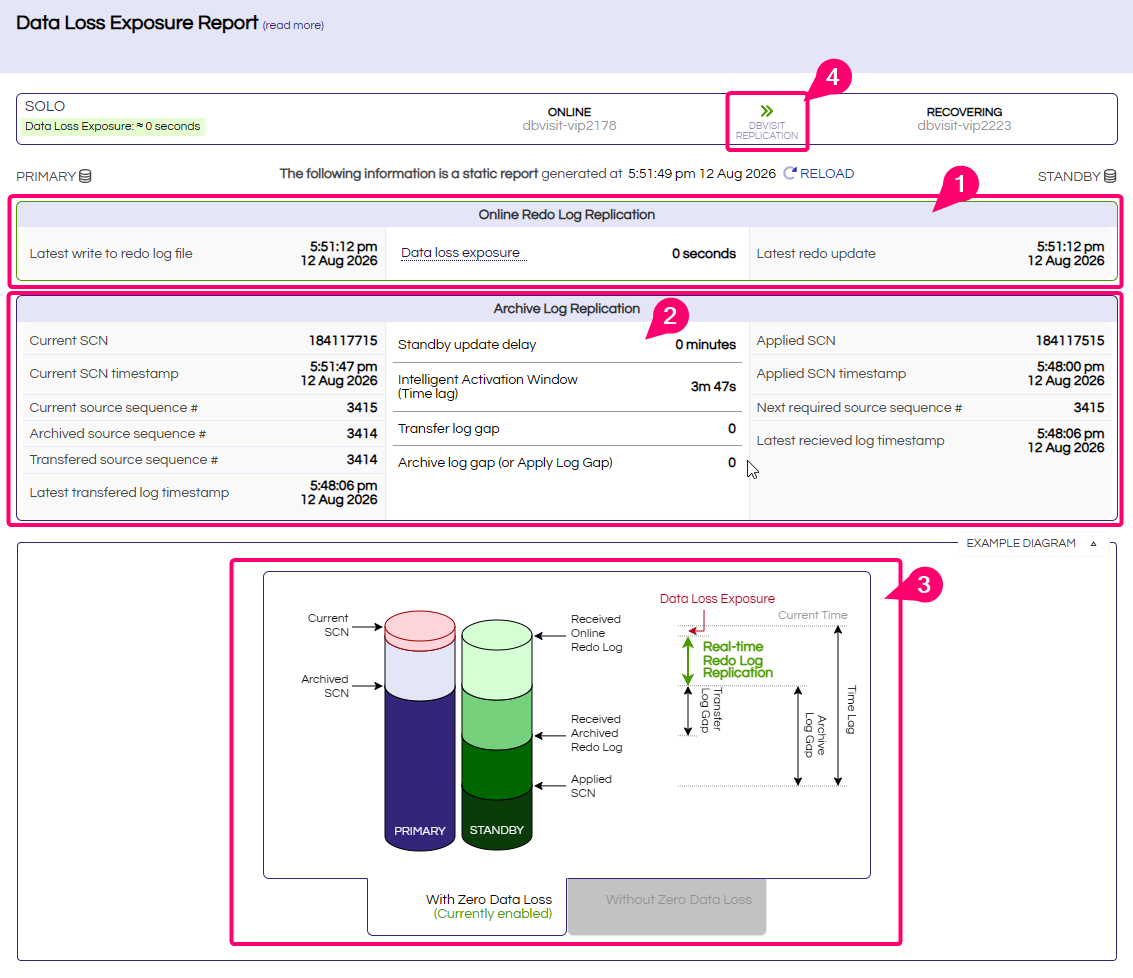
(1) The data loss exposure also clearly shows us when the last redo log was written on the primary and when this change was replicated to the standby.
(2) This view shows whether a delay has been configured for applying archive logs on the standby. It also shows the current fully applied archive-log window (3 minutes 47 seconds) before ZDL activation. The transfer-and-apply log gap is monitored and can be reported by email or Slack.
(3) A static image representation that complements the entire ZDL and also the archive log apply data provided.
(4) A simple dashboard status overview for environments with multiple configurations.
Achieving real-time visibility
Dbvisit StandbyMP also uses its monitoring component, Observer, to enable users to perform an automatic failover or to send notifications when the primary database is down or inaccessible.
Summary: The new Zero Data Loss standard
ZDL ultimately comes down to one question: are transactions committed on the primary also available on the standby for recovery? For many organisations, archive-log transfer from the primary and application to the standby alone no longer provides a sufficiently low RPO. Historically, unfortunately, Standard Edition offered few alternatives.
With the ZDL option for StandbyMP, Standard Edition environments can reduce data-loss exposure to a sub-second level. This means a sub-second RPO no longer necessarily requires Enterprise Edition, and a sub-second RPO is now the benchmark for data loss on all Oracle editions.
To learn more about ZDL for StandbyMP, here’s where to go next:
-
Explore the key capabilities and benefits of StandbyMP ZDL on our feature page.
-
Express your interest or request an upgrade by booking a discussion call with our team.
-
Read the V12.4 Release Notes and technical documentation.
-
Download the Trial with a license key for your environment, or try it in our Test Drive cloud environment.